
Ask a small team how long they spend copying data between systems and the answer is almost always “not that long, maybe twenty minutes a day.” It sounds like nothing. Then you multiply it out, and twenty minutes a day turns into a part-time job that nobody was hired to do.
This is a worked example you can redo with your own numbers. No industry statistics, no vendor claims: just arithmetic on the time your team already spends.
The setup
Picture a typical small business: orders come in through the website, get typed into the accounting system, and the customer details get copied into the CRM so sales can follow up. Four people touch this every day.
The $32 is a loaded rate: wages plus payroll taxes and benefits, which is what an hour of someone’s time actually costs the business. Use your own figure; it’s usually higher than people expect.
The arithmetic
| Step | Calculation | Result |
|---|---|---|
| Minutes a day | 4 people × 25 minutes | 100 min |
| Hours a month | 100 min × 21 working days ÷ 60 | 35 h |
| Hours a year | 35 h × 12 | 420 h |
| Cost a year | 420 h × $32 | $13,440 |
420 hours is about ten and a half working weeks. Every year, a quarter of a full-time person goes into retyping information that already exists somewhere else.
Twenty-five minutes a day doesn’t feel like a cost. Ten weeks a year does.
What the hours don’t include
The $13,440 is only the time spent typing. The costs that usually matter more don’t show up in that number:
- Fixing mistakes. Every manual copy is a chance for a transposed digit or a missed line. Finding and fixing those takes longer than the original entry, and some are found by customers first.
- Slower cash. If invoices go out when someone gets round to typing them, you get paid later. That’s a cash-flow cost even when nobody is idle.
- Decisions on stale numbers. Reports built from copies are only as current as the last time someone copied. Teams quietly stop trusting them.
- Key-person risk. When the one person who knows the routine is out, the work stops or gets done wrong.
These are real but hard to put a number on, so this example leaves them out. That makes everything below conservative.
Be honest about what automation removes
An integration rarely removes 100% of the manual work. Exceptions still need a person: an order with a typo in the address, a customer who should be merged, a refund that needs a judgement call. So compare realistic scenarios, not a fantasy.
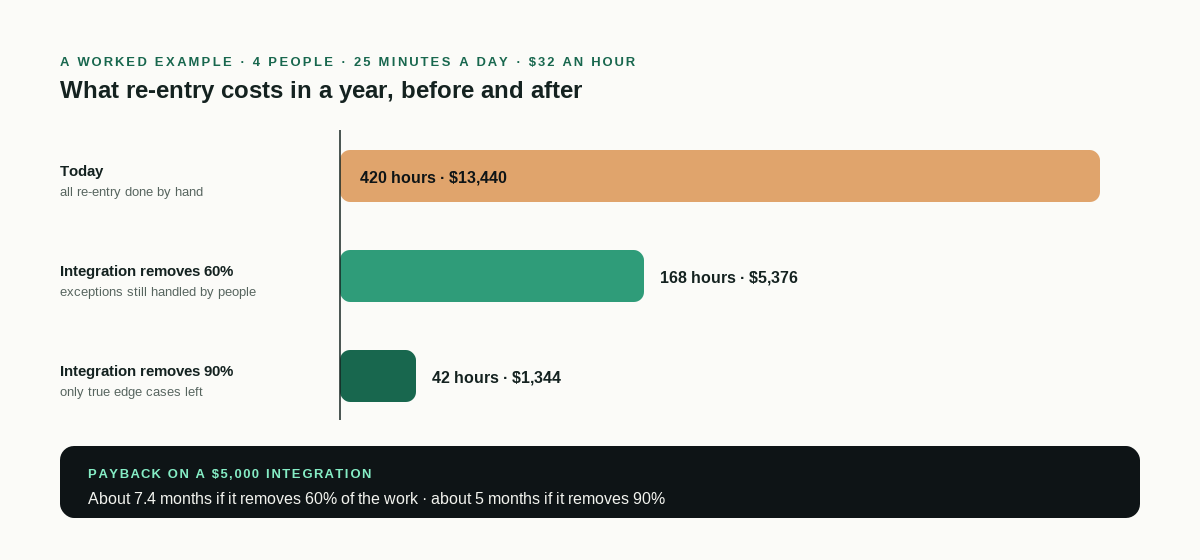
| Scenario | Hours left a year | Saved a year | Payback on $5,000 |
|---|---|---|---|
| Removes 60% of the work | 168 h | $8,064 | ~7.4 months |
| Removes 90% of the work | 42 h | $12,096 | ~5 months |
Payback is the build cost divided by the monthly saving: $5,000 ÷ ($8,064 ÷ 12) is about 7.4 months. Add ongoing costs, like a support plan or app subscription, to the build cost before you divide.
The calculator on our homepage does the first half of this in your browser. Move the sliders to match your team and it shows the hours and yearly cost. Nothing is sent anywhere.
When it doesn’t add up
Sometimes the honest answer is “don’t build it.” If one person spends ten minutes a day, that’s about 42 hours a year: around $1,300 at the same rate. A custom integration won’t pay back. A cheap off-the-shelf app might, or a better checklist might be enough.
The point of doing the arithmetic is to make the decision on numbers rather than frustration, in either direction.
How to measure your own baseline
- For one normal week, have each person note roughly how long they spend copying information between systems each day.
- Note every time a mistake from re-entry had to be fixed, and how long the fix took.
- Use a loaded hourly rate, not the wage alone.
- Multiply out to a year, then compare against realistic scenarios, not 100% removal.
One week of rough notes beats any industry average, because it’s your team and your systems.