
If you take payments through Stripe and keep your books in QuickBooks, you’ve stared at a deposit that matches nothing. The invoices say one thing, the bank says another, and somebody loses a Friday afternoon to a spreadsheet trying to make them agree.
Nothing is broken. Stripe simply doesn’t pay you the way your invoices expect, and once you see what’s inside a payout, the fix is surprisingly mechanical.
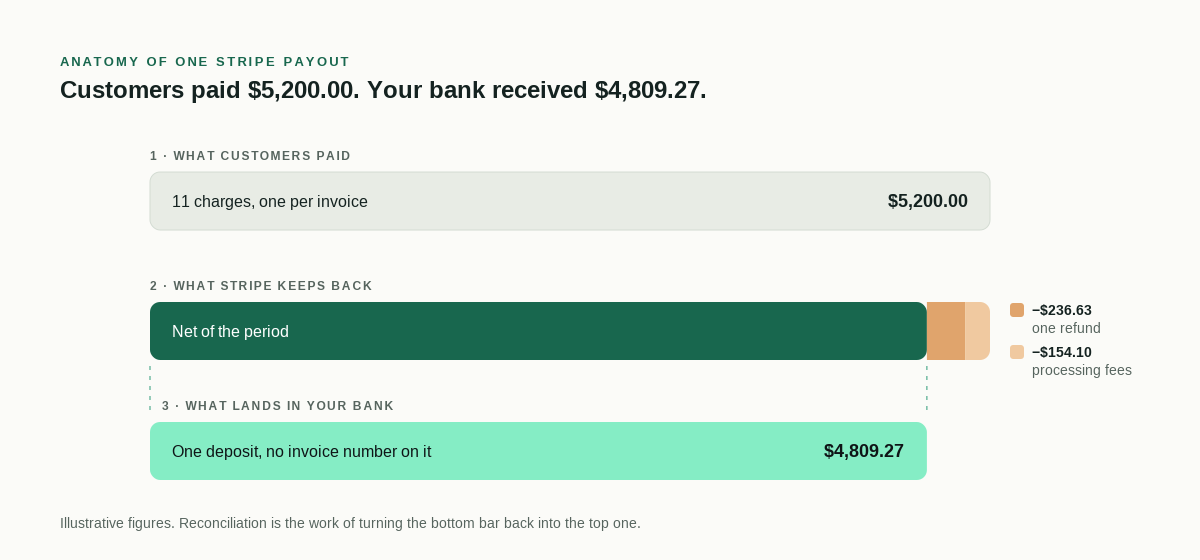
What is actually inside a payout
Stripe collects card payments for a few days, then sends them to your bank as a single transfer. Before it does, it nets out everything that happened in the meantime:
- Processing fees on every charge, deducted at the time of the charge.
- Refunds you issued during the period, even for sales made weeks earlier.
- Disputes, which pull the disputed amount plus a dispute fee.
- Adjustments, like a dispute you won being paid back, or currency conversion.
Here is the payout in the diagram, written as a ledger:
| Line | What it is | Amount |
|---|---|---|
| Charges | 11 card payments against 11 invoices | $5,200.00 |
| Refund | Order #1038, from the previous week | −$236.63 |
| Fees | Processing fees on the 11 charges | −$154.10 |
| Payout | One deposit to your bank | $4,809.27 |
None of the eleven invoices says $4,809.27. That’s the whole problem in one line.
Your bank sees a net number. Your invoices are gross numbers. Reconciliation is the work of putting the gross back together.
Why the spreadsheet fix keeps breaking
The usual workaround is to download Stripe’s payout report, tick off each charge against an invoice, and book the fees as one lump. It works on a quiet week. It falls apart when:
- A refund lands in a different payout from the sale it reverses.
- A customer pays two invoices in one charge, or one invoice in two.
- A dispute shows up a month later and quietly shrinks a payout.
- The one person who knows the routine is on holiday at month-end.
If you record each Stripe deposit as “sales” in QuickBooks, your revenue is understated by every fee and refund, and your invoices stay open forever. Both problems compound quietly until year-end.
The clearing account method
Accountants solve this with a clearing account: a holding account in QuickBooks, often called “Stripe Clearing”, that stands in for the money sitting at Stripe. Every movement goes through it:
- A charge is paid. The invoice is marked paid, and the money goes into Stripe Clearing, not the bank.
- Stripe takes a fee. The fee comes out of Stripe Clearing into a merchant fees expense account.
- A refund is issued. A refund receipt or credit comes out of Stripe Clearing against the original sale.
- The payout lands. A transfer moves $4,809.27 from Stripe Clearing to your bank, and it matches the bank feed exactly.
When everything is booked, Stripe Clearing’s balance should equal the balance Stripe shows in its dashboard. If it doesn’t, the difference points straight at the missing transaction.
Compare your Stripe Clearing balance with Stripe’s available plus pending balance on the last day of the month. If they agree, your books are reconciled. If they don’t, you know exactly where to look.
What a proper connection automates
A Stripe-to-QuickBooks connection does those four steps the same way every time, at the moment they happen:
- Each charge finds its invoice by an ID both systems store, not by matching amounts.
- Fees are posted per charge, so the fees report is exact rather than estimated.
- Refunds and disputes are recorded against the original sale, whichever payout they land in.
- Each payout is posted as a transfer, so the bank feed matches without anyone touching it.
- Anything that can’t be matched, like a charge with no invoice, is held with a reason for a person to decide.
Questions to answer before you build
- Do invoices start in QuickBooks, in Stripe, or in your own app?
- Do you sell subscriptions, one-time payments, or both?
- Which expense account should Stripe fees go to?
- Who reviews the transactions that can’t be matched automatically, and how quickly?
Sometimes an existing connector handles these well enough, and that’s the cheaper route. When it doesn’t, the connection is built directly on Stripe’s and QuickBooks’ APIs.