
Most integration projects start with a list of systems: the CRM, the accounting software, the online store. The ones that succeed start with a different list: every piece of data that moves, and which system is allowed to change it.
Skip that list and you get the classic failure. Someone fixes a customer’s address in QuickBooks, the sync copies the old address back from the CRM an hour later, and the fix silently disappears. Nobody did anything wrong; the integration just had no idea who was in charge.
“Two-way sync” is usually the wrong goal
When people ask for a two-way sync, they usually mean “I want the same information in both places.” Building it as “any change anywhere copies everywhere” causes three predictable problems:
- Edit ping-pong. Two people change the same field in two systems; the integration keeps copying one over the other.
- Last write wins. Whichever change synced most recently becomes the truth, even if it was the wrong one.
- Silent loss. Nothing errors, so nobody notices until a customer gets an invoice at an old address.
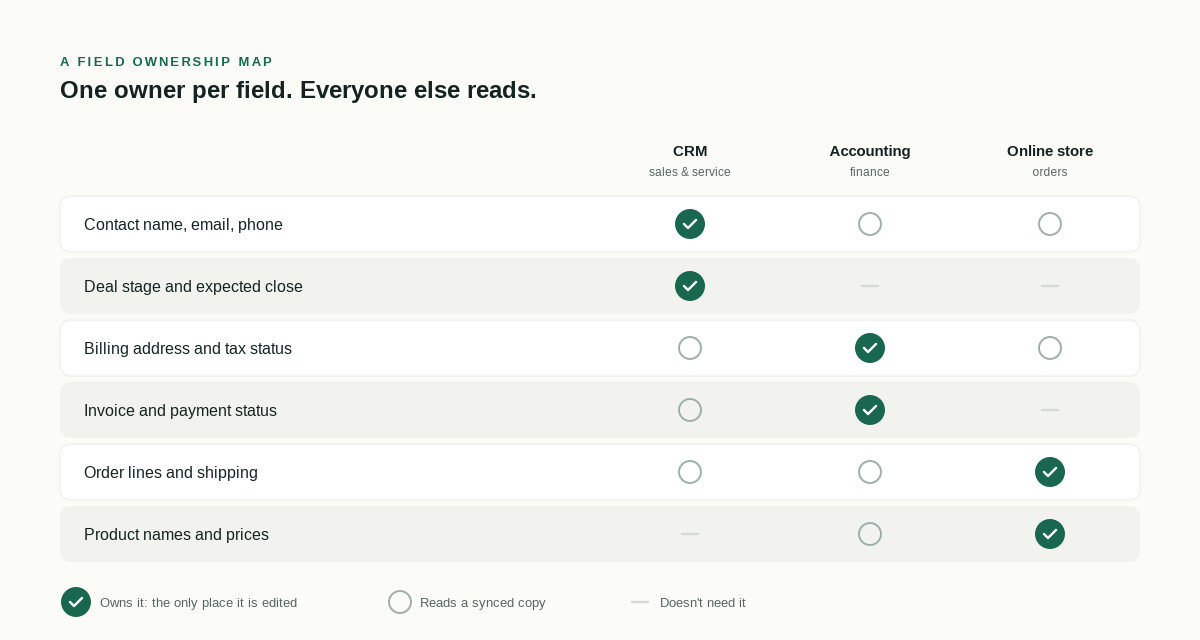
The fix isn’t a smarter sync. It’s a rule: every field has exactly one owner. The owner is the only place that field is edited. Every other system reads a copy.
Own fields, not whole records
It’s tempting to say “the CRM owns the customer.” In practice a customer record is a bundle of fields with different natural owners. Sales updates the phone number. Finance updates the billing address and tax exemption. The store knows what they ordered. Ownership works best field by field, which is what lets the same customer be edited by three teams without anyone overwriting anyone.
How to decide who owns a field
Three questions settle almost every case:
- Where is it created? The system where a field is first entered is usually the right owner.
- Who is accountable when it’s wrong? If finance gets the call about a wrong tax status, finance’s system owns it.
- Is there a record that must stay authoritative? Invoices and payments belong to accounting, because that’s the record your accountant and the tax authorities rely on.
Pick one owner and make the field read-only in the other system. If the other team genuinely needs to change it, give them a way to request the change in the owning system, not a second copy they can edit.
The other half: stable IDs
Ownership tells the integration who’s in charge. IDs tell it which record it’s talking about. Matching on names or email addresses breaks the moment someone marries, changes jobs or fixes a typo.
- When a record is first linked, store each system’s ID on the other side: the QuickBooks customer ID on the CRM account, and the CRM account ID on the QuickBooks customer.
- From then on, every sync matches by those IDs, never by name.
- Name and email matching is only for the first link, and anything ambiguous goes to a person to confirm.
Plan for conflicts anyway
Even with clear ownership, conflicts happen: someone edits a read-only copy through an import, or two records turn out to be the same customer. Decide in advance:
- What happens when a non-owner changes an owned field? (Usually: the owner’s value wins on the next sync, and the change is logged.)
- How are duplicates merged, and in which system first?
- Who gets told, and where do they see it?
A worksheet you can copy
Before any integration is built, fill in one row per field that moves. If you can’t fill in the “owner” column, you’re not ready to build yet.
| Field | Owner | Copied to | How fast | On conflict |
|---|---|---|---|---|
| Contact email | CRM | Accounting, store | Within minutes | CRM wins, change logged |
| Billing address | Accounting | CRM | Within minutes | Accounting wins |
| Invoice status | Accounting | CRM | Hourly | Read-only in CRM |
| Order lines | Store | Accounting | Daily summary | Never edited downstream |
This single page prevents more integration bugs than any amount of code review, because it turns “keep them in sync” into rules a developer can actually build and a person can actually check.